
STEP Robot Background Program Functions
2025-07-09

In industrial robotics applications, the multithreading capability of background programs is a key technology for efficiently executing complex tasks and enhancing overall system performance. It not only enables the execution of tasks... Parallel processing It can also drive a qualitative leap in robotic performance by optimizing resource allocation, ensuring real-time responsiveness, and achieving functional decoupling.
In this article, we will provide a detailed introduction to the functionality of STEP Robotics.
General background program functionality
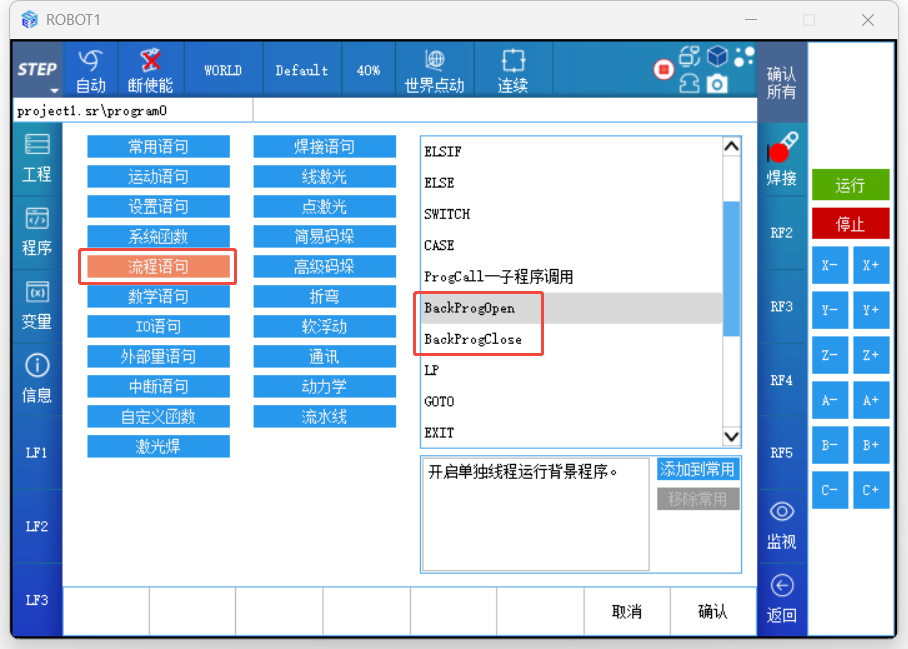
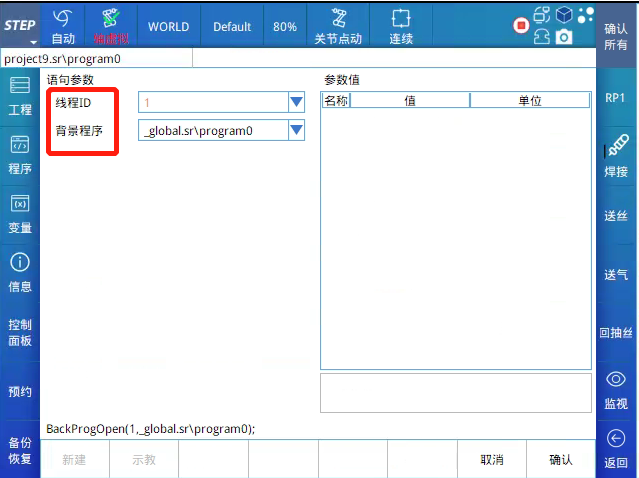
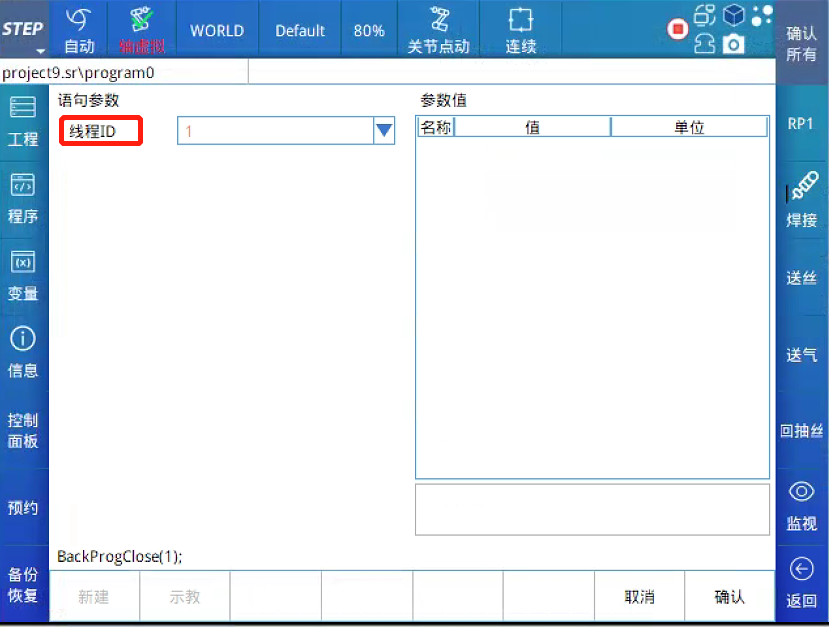
General background program launch command BackProgOpen has two parameters: the thread ID and the name of the regular background program. General background program shutdown command BackProgClose has only one parameter: the thread ID.
The thread ID value can be one of 1, 2, 3, or 4, meaning that at most only four regular background programs can be running simultaneously. The options for regular background programs are similar to... Subroutine To call, you can select the program name from the global project as well as other program names within the same project.
In Main program When this statement is called in the background, the regular background program will be started simultaneously—that is, the regular background program will begin running.
System background program functions
System background programs, also known as startup background programs, are not affected by the main program’s loading, uninstalling, error reporting, emergency stops, or pauses, and can run continuously in the background.
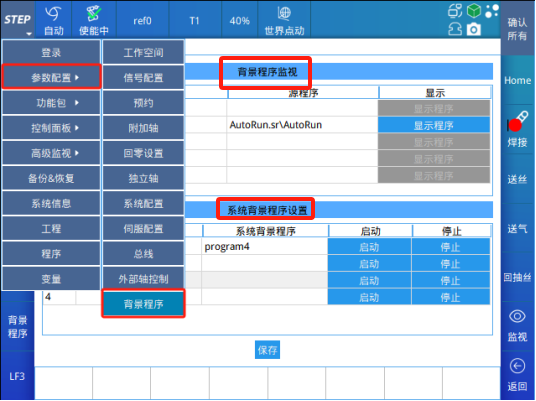
The background program monitoring interface allows you to view the background programs that are currently running, as well as the source programs that invoke these background programs and the main program itself. In the table below, the source program listed in the first row under "main" is the program currently loaded; rows 2 through 5 provide information about the background programs. For example, in the row with serial number 1, the "Background Program" column displays the name of the background program whose thread ID is 1. If it’s a regular background program, the "Source Program" column shows the name of the program that initiated the background program with thread ID 1. If it’s a system-level background program, the "Source Program" column displays AutoRun.sr\AutoRun.
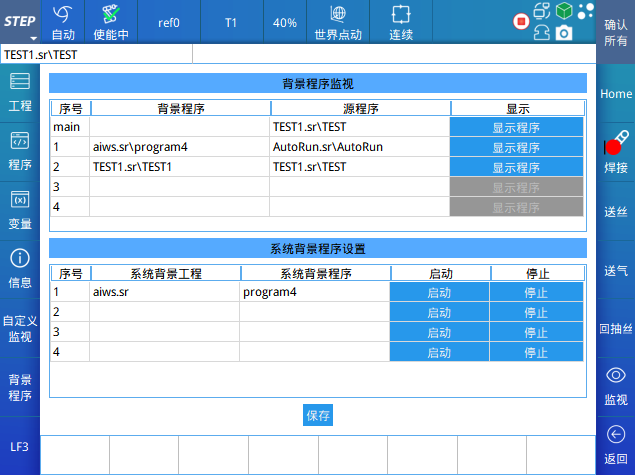
Click the “Display Program” button in the main row to display the currently running main program. Click the “Display Program” button in the rows corresponding to sequence numbers 1 through 4 to display the background programs with thread IDs 1 through 4, respectively, allowing you to check the running status of these background programs.
Background program statement restrictions
Flow statements
WHILE, END_WHILE, LOOP, END_LOOP, IF, ELSIF, ELSE, END_IF, SWITCH, END_SWITCH, CASE, LP, GOTO, Wait;
System function
WaitTime, … := …, #..., //…, GetCurrentPos, GetCurrentOverride, Message, MessageErase, WriteLog ClearLog, Pause, RecordList, SaveData, ClkStart, ClkStop, ClkReset, ClkRead, CDate CTime;
I/O statement
DIRead, DIWait, DOSet, DOPulse, GDIRead, GDIWait, GDOSet, AIRead, AIWait, AIWaitGreater, AIWaitLess, AOSet;
Setting statement
Override, AxisSpaceActivate, CartSpaceActivate, ReadAxisSpaceState, ReadCartSpaceState, SetAxisSpaceMode, SetCartSpaceMode;
Mathematical statement / Communication statement / External variable statement
Fully supported.
Application Cases
In the application of photovoltaic cell string layout, visual positioning of incoming cell strings is a critical step. Communication between the vision system and the robot is achieved via sockets. To further improve production throughput, the code related to socket communication can be integrated into a regular background program. The main program retrieves data by calling the background program, thereby optimizing the overall process and enhancing production efficiency.

Whether it’s the flexible invocation and resource optimization of ordinary background programs or the stable operation and independence of system background programs, all provide solid technical support for industrial automation scenarios. We firmly believe that in the future development of industrial automation, the continuous innovation and refinement of background programs will inject even stronger momentum into the intelligent and efficient transformation of industrial production.

Contact Us
Email:
market@stepelectric.com
Address:
No. 1560, Siyi Road, Jiading District, Shanghai Municipality