
STEP Robotics’ offline programming and simulation software CAM features a comprehensive upgrade.
2025-02-13

On September 20, 2024, the Ministry of Industry and Information Technology carefully organized the preparation and officially released to the public the “Guidelines for Equipment Upgrading and Technological Transformation in Key Industrial Sectors (Key Industries)” (hereinafter referred to as the “Guidelines”).
To thoroughly implement the national strategic plan aimed at strengthening the core competitiveness of the industrial sector and promoting high-quality development of manufacturing, and to further enhance the resilience and security of China’s industrial chains and supply chains, STEP offline programming and simulation software, STEPStudio, has achieved a major breakthrough—completing a comprehensive upgrade of its CAM functionality.
The Guide covers several key industrial sectors and, in the area of industrial software, proposes prioritizing updates to a range of products—including computer-aided manufacturing (CAM). By 2027, the goal is to complete the upgrade and replacement of approximately 2 million sets of industrial software and 800,000 sets of industrial operating systems.
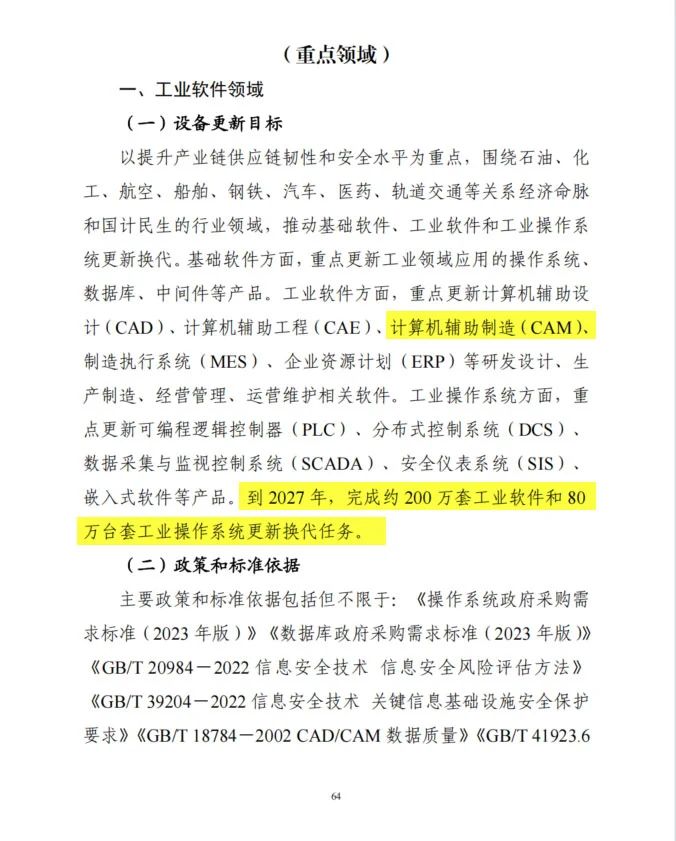
Page 64 of the Guide
The Use of CAM in the Field of Industrial Robotics
CAM, or Computer-Aided Manufacturing, refers to the use of computer systems to design, plan, control, and optimize manufacturing processes.
So, in the process of industrial robot application, what kind of assistance can CAM software provide?
For machining applications involving complex surfaces—such as grinding and cutting—it is difficult for humans to precisely teach robots the desired motion trajectories. However, the CAM function can automatically plan robot motion paths based on imported 3D models, quickly generate robot motion waypoints, significantly reduce programming and debugging time, and ensure high-precision machining.
CAM Programming Advantages of STEPStudio
STEPStudio boasts a wealth of CAM programming strategies. The software offers multiple path-generation methods, deeply mining line and surface features from model data, precisely analyzing running positions through geometric models, efficiently completing path planning, and reducing debugging time.
More abundant path generation strategies
• Automatic Path: The STEPStudio automatic path function allows you to quickly extract the trajectories of complex curves and generate robot work points.
• Surface Streamlines: This feature analyzes the geometry of a surface, parameterizes the surface, and extracts characteristics such as curvature, convexity/concavity, U-lines, and V-lines. Based on the analysis results, it automatically generates and arranges point locations that perfectly conform to the surface’s shape.
• Parallel Sections: For machining flat surfaces, you can use the software’s parallel section function. Within the software, equidistant parallel cutting lines are generated by offsetting along the X-Z plane on the flat surface according to the set gap and angle.
• Contouring: For cylindrical models, the contouring feature allows you to quickly extract surface trajectories. The software will generate equally spaced contour lines along the Z-axis by evenly sampling the surface at intervals defined by the set gap.
• Projecting Curves: The curve projection function allows you to project a curve onto a specified surface and create a path based on the resulting projected curve.
• Mid-surface line: Using the mid-surface line function, you can automatically create a mid-surface line based on two pairs of edges and the selected surface, thereby generating a path.
The point-generation method is more flexible.
When generating robot operating points, the path trajectory can be uniformly distributed according to equal arc lengths or flexibly generated based on constant chord height error, ensuring both smoothness and precision of the robot’s motion trajectory and further enhancing the quality of machining.
Seamless integration of post-processing operation software
The post-processor of STEP STEPStudio offline programming and simulation software is seamlessly integrated with STEP robot operating software SRS (STEP Robot System). Motion parameters are generated synchronously along with the waypoint information. The path program can be directly imported into the controller via the software’s file transfer function and then executed using the teach pendant.
Additional axis coordination
STEP’ CAM programming is also applicable to scenarios involving coordinated motion of additional axes. When generating robot program points based on path trajectories, you can either customarily assign specific motion angles for the additional axes along designated path segments, or predefine the robot’s pose and additional-axis angles at the path’s starting point. The software will then automatically calculate the information for the remaining discrete points. Both flexible setup methods enable coordinated motion between the robot and the additional axes.
This update not only greatly enhances programming efficiency but also significantly improves simulation accuracy, enabling engineers to more precisely predict various scenarios in the production process within a virtual environment. In the future, STEPStudio will continue to deliver even greater value to the field of industrial automation.
Previous:

Contact Us
Email:
market@stepelectric.com
Address:
No. 1560, Siyi Road, Jiading District, Shanghai Municipality